How to Do Keyword Research for Your Google Ads Campaign


Finding the right keywords can make or break your Google Ads campaign. 65% of users click on ads when making purchases, which means getting your keyword research right directly impacts your bottom line. I learned this the hard way when my first campaign tanked because I threw random keywords together without any strategy.
Table Of Contents
- Quick Guide: What You'll Learn
- Getting Started with Google Keyword Planner
- Understanding Keyword Intent and Ad Group Structure
- Finding High-Quality Keywords That Convert
- The Power of Negative Keywords
- Using Search Terms Reports for Continuous Improvement
- Advanced Tips for Better Keyword Research
- Common Keyword Research Mistakes to Avoid
- Measuring Keyword Research Success
- Work with a Google Ads Specialist
Quick Guide: What You’ll Learn
Here’s what we’ll cover to master Google Ads keyword research:
- Setting up Google Keyword Planner correctly
- Creating focused ad groups based on user intent
- Finding high-quality keywords that convert
- Using negative keywords to block unwanted traffic
- Monitoring search terms to improve performance over time
Let me walk you through the exact process I use to find profitable keywords for any business.
Getting Started with Google Keyword Planner
Google Keyword Planner is your best friend for keyword research. It’s free, accurate, and gives you data straight from Google’s search engine. Here’s how to set it up properly.
First, navigate to Tools in your Google Ads account and click Keyword Planner. The interface looks intimidating at first, but it’s simpler than it appears. Change your location settings to match exactly where your business operates or where you want to target customers. This step matters more than most people realize because keyword data varies significantly by location.
When I started doing Google AdWords, I made the mistake of leaving the location as “Nigeria.” The search volumes were completely wrong for my Lagos-based campaign. Always double-check your location settings before diving into keyword research.
Understanding Keyword Intent and Ad Group Structure
Google Ads keyword research starts with understanding user intent. People search differently depending on what they want. Someone typing “dentist near me” has different intentions than someone searching “teeth whitening cost.”
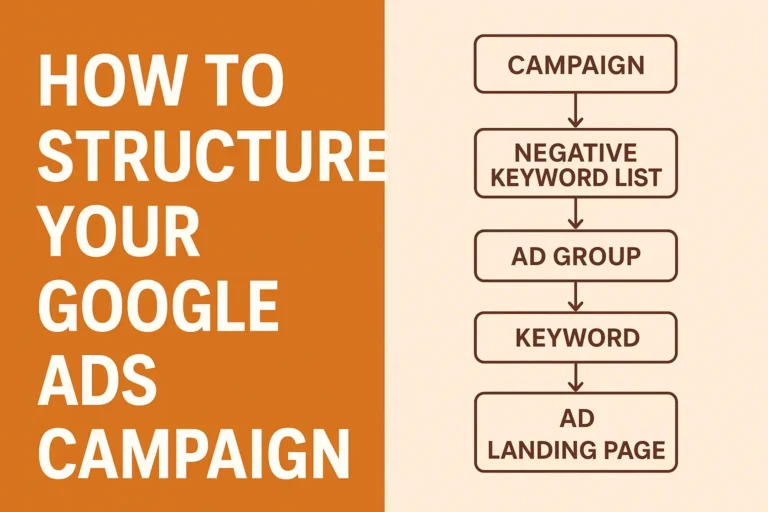
Structure your ad groups around specific services or intentions. Create separate ad groups for general dental services, teeth whitening, braces, and dental emergencies. Each ad group should contain only keywords related to that specific service. This approach improves your Quality Score and makes your ads more relevant to searchers.
I once audited a client’s account that mixed all their dental keywords into one massive ad group. Their Quality Scores were terrible, and they were paying twice as much per click as their competitors. We restructured everything into focused ad groups, and their costs dropped by 40% within two weeks.
Finding High-Quality Keywords That Convert
Start your Google Ads keyword research by entering your main service into Keyword Planner. For a dental practice, begin with “dentist” and analyze the results. The tool shows you related keywords, monthly search volumes, and average cost-per-click data.
Look for keywords with decent search volume and commercial intent. “Dentist near me” is gold because it shows local intent. “Dental clinic appointments” indicates someone ready to book. “Best dentist in [your city]” suggests comparison shopping.
Don’t chase every keyword suggestion. Google’s algorithm is smart enough to match related searches to your main keywords. If you bid on “dentist near me,” Google will also show your ad for “dentist in my area” without you adding that exact phrase.
Focus on quality over quantity. Ten highly relevant keywords outperform 100 loosely related ones. I typically start campaigns with 5-10 carefully selected keywords per ad group and expand based on performance data.
The Power of Negative Keywords
Negative keywords are the unsung heroes of Google Ads keyword research. They prevent your ads from showing for irrelevant searches, saving you money and improving campaign performance.
Start with obvious negative keywords like “free,” “salary,” “jobs,” and “DIY.” For a dental practice, add negatives like “dental school,” “dental assistant salary,” and “home remedies.” These searches won’t convert into paying patients.
I learned about negative keywords the expensive way. A client’s ad for “teeth whitening” kept showing for “teeth whitening at home” searches. We were paying for clicks from people who wanted to do it themselves, not visit a dentist. Adding “home” as a phrase match negative keyword immediately improved our conversion rates.
Create a master negative keyword list that applies to all campaigns. This saves time and prevents common irrelevant searches across your account. You can find more guidance on how to run Google ads effectively in our comprehensive guide.
Using Search Terms Reports for Continuous Improvement
Search Terms Reports are where Google Ads keyword research gets interesting. After your campaign runs for a week or two, check which actual search terms triggered your ads. You’ll discover new keyword opportunities and identify irrelevant searches to block.
Navigate to Insights and Reports, then click Search Terms. Review the list carefully. Look for search terms with good click-through rates and conversions. Add these as new keywords to your campaigns. Identify irrelevant terms and add them as negative keywords.
This process never ends. I check search terms weekly for active campaigns. It’s how you discover long-tail keywords that convert well but weren’t obvious during initial research. Some of my best-performing keywords came from search terms reports, not from Keyword Planner suggestions.
The data also reveals how people actually search for your services. You might target “dental implants” but discover people search for “tooth replacement options” or “permanent tooth solutions.” These insights help you understand your audience better.
Advanced Tips for Better Keyword Research
Match types matter in Google Ads keyword research. Use exact or phrase match for your most important keywords to maintain control. Broad match modified keywords can help you discover new search terms, but monitor them closely.
Seasonal trends affect keyword performance. Plan your keyword research around these patterns. Knowing how much Google Ads costs helps you budget more effectively.
Competitor analysis adds another layer to your research. See which keywords competitors bid on, but don’t copy blindly. Their strategy might not work for your business model or budget.
Geographic modifiers work well for local businesses. “Dentist in Victoria Island” or “Lagos dental clinic” can be less competitive than broader terms. These location-specific keywords often convert better because they show clear local intent.
Common Keyword Research Mistakes to Avoid
Many businesses stuff too many keywords into ad groups. This dilutes relevance and hurts Quality Scores. Stick to tightly themed keyword groups. If you can’t write a single ad that speaks to all keywords in an ad group, split them up.
Ignoring search volume data leads to wasted effort. Keywords with zero monthly searches won’t drive traffic. Focus on keywords with at least 100 monthly searches in your target location. Exceptions exist for highly specific, high-value services, but they’re rare.
Bidding on competitor names seems smart but often backfires. Your Quality Score suffers when your ad isn’t relevant to their branded searches. Focus on your own brand and service keywords instead.
Forgetting mobile users misses huge opportunities. Mobile searches often include “near me” modifiers and show stronger local intent. Optimize your keyword research for mobile search patterns, especially for local businesses.
Related: Google Ads vs Facebook Ads
Measuring Keyword Research Success
Track the right metrics to evaluate your Google Ads keyword research effectiveness. Click-through rate indicates ad relevance to search terms. Conversion rate shows if keywords attract qualified traffic. Cost per acquisition reveals profitability.
Quality Score combines these factors into one metric. High Quality Scores mean lower costs and better ad positions. If your Quality Scores are below 7, revisit your keyword research and ad group structure.
Return on ad spend (ROAS) is the ultimate measure. Calculate how much revenue each keyword generates compared to its cost. Focus budget on high-ROAS keywords and pause or optimize low performers.
Set up conversion tracking before launching campaigns. Without it, you’re flying blind. You need data to make informed decisions about which keywords to expand, pause, or optimize.
Work with a Google Ads Specialist
If you’re feeling overwhelmed by the process, consider working with top Google Ads agencies that can accelerate your results. Professional management ensures you avoid costly mistakes while implementing advanced strategies.
If you’re ready to transform your Google Ads performance? Click the link below